hacking + interaction &&&&MAGIC
In dit skills blok onderzoek je hoe je
︎︎︎ Terug naar de hoofdpagina
In dit skills blok onderzoek je hoe je
interactieve en generatieve tools in kan zetten
in de fysieke wereld om je verhaal te vertellen.
︎︎︎ Terug naar de hoofdpagina
workshop: EMBEDDING STREAMS AND FINDING MEANING
![]()
Imagine your circuit to be done and concept to be clear.
1. *Modes*Chapters*Steps*
What are the different modes/chapters/steps (choose whatever term feels fitting) of your work?
Examples: sleepmode, activation, action, generation, dream, beginning, end, database visualisation etc.
How long do they take?
Examples: sleepmode is forever when interacted step 2 is maximum 1 minute, after that it returns to sleepmode
What do you want the visitor to feel and experience?
Examples: clear transitions, dream like feeling, privacy breach, agency, softness, eating a rainbow, etc.
What technology is used with what function?
Examples: during chapter 2 the depth sensor triggers chapter 3, when pushing the button during step 5 you return to the loading screen, etc.
What media can you use to make the *modes*chapters*steps* intuitive and clear?
Examples: (generative) audio, video, image, etc.
Is the visitor able to interact during the step?And how does this get clear + feel natural?
What information is shared with the visitor and how does this relate to their attention span?
Examples: during step 2 a light starts glowing, a text appears, a sound starts playing, etc.
What happens to the visitor when they experienced the interactive art installation?
Examples: it results in emotional engagement, storytelling, evoked a feeling, sensory immersion, discovery/exploration, social interaction, critical inquiry, reflection/contemplation etc.
Online tools to make a: timeline, storyboard, flowchart
![]()
Take your interaction timeline as a starting point and quickly design/visualise different ‘tone of voices’ for your *Modes*Chapters*Steps*
Examples: this can be a (visual) system, (interface) design, symbols, material moodboard, a graphic cohesion, contrasting images, typography etc.
Make sure it improves the experience of the interaction.
Think of what you communicate, it can help to write this out.
Focus on how this can be translated in form, design and tactility through out the complete project. Use the power of graphic design and keep your concept in mind. :)
![]()
The collective .nvisible studio uses The Futures Wheel to make their non-lineair videowork. Example: Embodied Ambitopias is a speculative fiction series about agency in the quantified age. It explores how distinct value paradigms, mediated through societal rhetoric and technology, influence us in affective and pre-conscious ways. Interview about the work.
Short exercises:
STORYTELLING REFERENCES
Lineair Narratives
Non-lineair Narratives
Examples from presentation
EXERCISE 1: INTERACTION TIMELINE

Imagine your circuit to be done and concept to be clear.
Make a timeline (chart or storyboard) of the interaction in your art installation.
Do that by drawing/photoshopping and answering these questions:
1. *Modes*Chapters*Steps*
What are the different modes/chapters/steps (choose whatever term feels fitting) of your work? Examples: sleepmode, activation, action, generation, dream, beginning, end, database visualisation etc.
How long do they take?
Examples: sleepmode is forever when interacted step 2 is maximum 1 minute, after that it returns to sleepmode
What do you want the visitor to feel and experience?
Examples: clear transitions, dream like feeling, privacy breach, agency, softness, eating a rainbow, etc.
What technology is used with what function?
Examples: during chapter 2 the depth sensor triggers chapter 3, when pushing the button during step 5 you return to the loading screen, etc.
What media can you use to make the *modes*chapters*steps* intuitive and clear?
Examples: (generative) audio, video, image, etc.
Is the visitor able to interact during the step?And how does this get clear + feel natural?
What information is shared with the visitor and how does this relate to their attention span?
Examples: during step 2 a light starts glowing, a text appears, a sound starts playing, etc.
What happens to the visitor when they experienced the interactive art installation?
Examples: it results in emotional engagement, storytelling, evoked a feeling, sensory immersion, discovery/exploration, social interaction, critical inquiry, reflection/contemplation etc.
Online tools to make a: timeline, storyboard, flowchart

EXERCISE 2: FINDING FORM - SPECULATIVE DESIGN
Take your interaction timeline as a starting point and quickly design/visualise different ‘tone of voices’ for your *Modes*Chapters*Steps*
Examples: this can be a (visual) system, (interface) design, symbols, material moodboard, a graphic cohesion, contrasting images, typography etc. Make sure it improves the experience of the interaction.
Think of what you communicate, it can help to write this out.
Do this by fast prototyping in software that feels natural (processing, photoshop, using AI, collecting images from pinterest, whatever you prefer!)
Focus on how this can be translated in form, design and tactility through out the complete project. Use the power of graphic design and keep your concept in mind. :)
Examples of projects that ‘visualise’ in a graphic language that strengthens the concept
- Deep Down Tidal - Tabita Rezaire (video essay in typical net art style, weaving together cosmological, spiritual, political and technological narratives about water – and its role in communication, in the history and now. The nostalgic net art style strenghtens the story about the history of the internet.)
- The Black Box Bellagio - Roos Groothuizen (an unusual casino that won't take your money, but is after your freedom, integrity and private data instead. Roos uses the form of a casino to play with the themes: (un)fairness of expected values and chances, predicted risks, and giving up your identity.)
- Get Popular Vending Machine - Dries de Poorter (A vending machine full of scratch tickets where you can win upto 25.000 fake followers for you Instagram or Twitter account. A ticket cost EUR 1.)
Odds of winning: 5% - Artists that are into neo-crafts (classic crafts hyperdrived by tech): Josèfa Ntjam, Delphine Dejeune and Teresa Fernández-Pello
Tools and services
Here are some tools/services that we use when making physical installations:- Thingiverse + Printables (download 3d print designs, there are a lot of casings for your sensors, arduino etc.)
- Thinkercad (simple online tool for 3d modelling - you can export it for laser cutting and 3d printing - but also easily tweak the design of your downloaded models) + Womp (a bit more complex but goopy and round 3d model design tool)
- Print en Bind (cheap printer for stickers, printed cardboard and weird materials), Drukwerkdeal (custom stickers for a good price)
- Snijlab (laser cutting service, order online!)
- Arcadewinkel (best place for buying buttons and arcade stuff)
- How to make your own arcade bar top instructables
OPTIONAL EXERCISE 3: FINDING MEANING - WORLDBUILDING
It can help to deepen the concept of your work by building a (speculative) ‘world’ around it. Some exercises to explore this are:
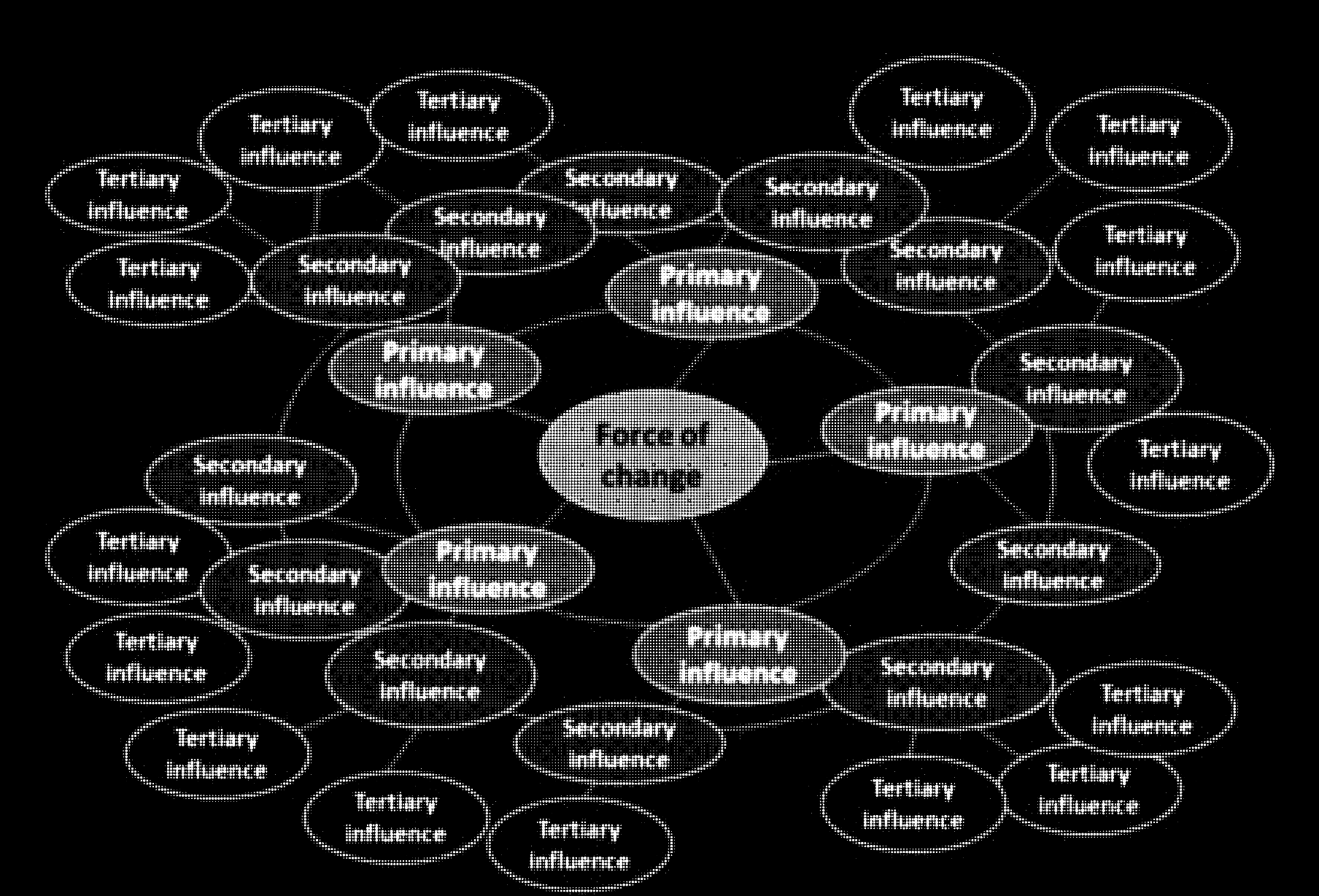
The Futures Wheel
- Identify the Core Idea: Define the central concept or theme of your interactive artwork.
- Create the First Ring: Draw a circle in the center of a large sheet of paper and write your core idea inside it (in the graph: force of change). Around this circle, draw another ring and fill it with direct consequences or primary effects of your core idea.
- Expand to Second and Third Rings: For each consequence in the first ring, draw lines connecting them to new circles in a second ring. In these circles, write the secondary effects. Repeat this for a third ring if needed, exploring deeper impacts.
- Analyze Patterns and Connections: Look for interesting patterns, connections, and emergent themes among the effects. Consider how these can inform the interactive elements of your artwork.
The collective .nvisible studio uses The Futures Wheel to make their non-lineair videowork. Example: Embodied Ambitopias is a speculative fiction series about agency in the quantified age. It explores how distinct value paradigms, mediated through societal rhetoric and technology, influence us in affective and pre-conscious ways. Interview about the work.
Short exercises:
- Character Creation
- Creation myth
-
Historical events
- Interactive mapping
-
Random Event Generator
- Mapping the world
STORYTELLING REFERENCES
Lineair Narratives
- Chronological order
- Cause and effect
- Setup, confrontation, resolution
- Hero’s journey
- Point A > B
Non-lineair Narratives
- Choose your own adventure
- Data driven narrative (real-time or historical data input)
- Collaborative storytelling (let user add on to the story that unfolds)
- Parallel storylines (2 perspectives that unfold at the same time, switch between)
- Emergent storytelling (reactive to environment changes)
- Temporal manipulation (flashbacks, forwards, time loops), fragments (viewer needs to stitch it together).
- Time manipulation devices (enables characters to revisit past events, alter the course of history, or explore alternate timelines)
- Installation with sleepmode + generative experiment (user input, random variables)
Examples from presentation
- Bandersnatch - Black Mirror (experience here)
- Sisters of the Wind - jujulove (experience here)
- Survival of the Best Fit game (experience here)
- 868 MHz by Louisa Teichmann (link to project)